Aug 5, 2026 • 5 min read
Generating Apple and Google Wallet Passes

CATEGORIES
SOCIAL SHARE
What Ticketing Companies and Event Organizers Need to Know
More attendees than ever expect to carry their tickets in Apple Wallet or Google Wallet. But before a ticket gets scanned or tapped at the door, someone has to generate that pass — and that step is often more involved than organizers expect.
This article covers what it actually takes to issue Apple Wallet and Google Wallet passes, why many ticketing companies choose to work with an approved pass provider rather than build this capability themselves, and how CodeREADr fits into the validation process. Over 100 ticketing companies and 1000s of event organizers use the app for event access control.
CodeREADr does not need to generate a pass to validate it. It can validate the identifier delivered by a barcode, QR code, Apple VAS tap, or Google Smart Tap transaction.
Generating Wallet Passes Isn’t Plug-and-Play
Generating production-ready Apple Wallet and Google Wallet passes requires an issuer account, platform-specific credentials, and the infrastructure needed to create, distribute, and update the passes. The requirements are relatively accessible for barcode and QR passes but become more involved when NFC redemption is added.
For companies with the right development resources, becoming an approved issuer is a worthwhile investment: it means full control over the pass design, the data it carries, and how updates are pushed to attendees’ phones. But for many ticketing companies and event organizers, that investment only makes sense up to a point — and NFC is where the calculus tends to change.
Barcode/QR Passes vs. NFC: Weighing the Options
Both approaches let attendees carry a ticket in Apple Wallet or Google Wallet, but they differ significantly in what it takes to get there and what attendees experience at the gate.
Barcode/QR wallet passes are the lighter lift. A ticketing company can become its own approved issuer through a largely self-service process — a standard Apple Developer account and a short Google Wallet business review — with no special hardware or security certification required. The tradeoff is the validation experience: a barcode or QR code is a visible identifier that any camera can capture and share, so anti-fraud protection depends entirely on backend validation logic rather than the credential itself.
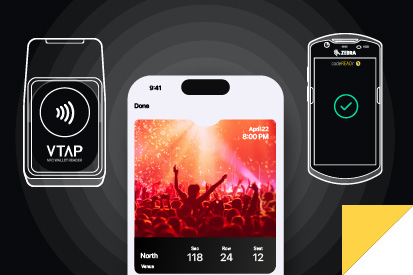
NFC wallet passes flip that tradeoff. NFC redemption uses an authenticated, encrypted exchange between the Wallet application and a compatible reader. Because there is no visible credential for an attendee to screenshot or casually forward, NFC can provide substantially stronger protection against common forms of ticket sharing and duplication. Also, tap-to-enter lanes move faster than scan lanes at high-volume gates. But getting there requires certified reader hardware and a separate approval process with each platform to access secure element data — on top of the standard pass-issuing setup. It’s a bigger investment, better suited to organizations prioritizing security and throughput at scale than to those just getting digital passes off the ground.
| Requirement | Barcode/QR passes only | NFC (VAS / Smart Tap) |
| Apple approval needed | Standard Apple Developer Program account — self-service, no special review | Apple Developer account, plus separate VAS certification for secure element access |
| Google approval needed | Issuer account and completed business profile; Google reviews the account before granting production publishing access. | Issuer account, plus Smart Tap terminal and key configuration, provisioned separately |
| Credentials | Apple signing certificate or Google Wallet issuer/API credentials | Additional platform-specific NFC credentials, identifiers, keys, and terminal provisioning |
| Hardware | Optical imager or camera capable of scanning a phone display | Certified NFC readers required (e.g., Zebra, VTAP) |
| Approval timeline | Days, mostly self-service | Longer, due to hardware certification and secure element access approval |
| Ongoing maintenance | Renew the Pass Type ID certificate annually | Renew certificates, plus manage Reader Keys and hardware provisioning |
| Security model | Visible code; fraud prevention relies on backend validation | Encrypted, device-bound handshake with hardware-level authenticity check |
In short: a ticketing company can realistically become its own barcode/QR pass issuer without much friction. NFC is a bigger step up — one that pays off in security and speed, but is worth weighing against the added hardware and certification investment
Why Organizations Choose NFC Despite the Extra Investment
Here are a few reasons why NFC passes are used instead of barcodes.
- Stronger fraud resistance
The NFC credential is not exposed as a visible code that can simply be screenshotted or forwarded, making common forms of credential copying much more difficult. - Faster throughput
NFC can reduce the aiming and alignment required for optical scanning, potentially improving throughput at high-volume entrances when the reader and validation workflow are properly configured. - Hardware-level authenticity checks
The reader confirms the pass is genuine before it’s ever handed off to CodeREADr, rather than relying solely on backend validation after the fact. - A more premium, walk-up-and-go experience
Useful for VIP lanes, premium tiers, or brand moments where speed and simplicity matter.
That’s why, in practice, many ticketing companies and organizers end up choosing between two paths: build the necessary approvals themselves, or work with a pass provider that’s already done it.
What a Pass Provider Does
A pass provider (sometimes called an “aggregator”) is a specialized company that maintains the platform credentials and infrastructure needed to create, distribute, update, and manage Wallet passes for other organizations. For NFC deployments, the provider may also maintain the required platform relationships and integrations with compatible reader technology.
Instead of a ticketing company or organizer building and maintaining that capability in-house, they can rely on a pass provider to issue passes on their behalf — while still controlling the ticket data itself.
In practice, this means:
- The ticketing company or organizer still owns and controls the ticket IDs and event data.
- The pass provider handles turning that data into a valid, properly formatted Apple or Google Wallet pass.
- Attendees get the same tap-to-enter or scan-to-enter experience, regardless of who generated the pass behind the scenes.
Whether a business builds this capability itself or works with a pass provider, the end result for attendees looks the same. The difference is entirely in how the pass gets created — which is exactly why it’s worth understanding where CodeREADr fits into that picture.
Pass Providers Often Do More Than Just Issue Passes
Getting through Apple’s and Google’s approval process is only part of what a pass provider offers. Many also provide the infrastructure to use the pass as an additional engagement channel before and after the event itself:
- Pre-event touchpoints
Parking details, arrival reminders, weather information, or gate changes delivered through pass updates and, where supported and enabled, surfaced as Wallet notifications or lock-screen suggestions. - Post-event follow-up
Thank-you messages, loyalty offers, or promotions for the next event, extending the pass’s usefulness beyond the point at which it’s been validated. - Update and notification infrastructure
The systems needed to trigger, segment, and manage these messages at scale.
If a ticketing company wanted this functionality without a pass provider, it would generally mean building and maintaining its own notification infrastructure and update-triggering system — on top of the approval and pass-issuance work already covered above. That’s real, ongoing dev and support cost, not a one-time setup step. For many ticketing companies, this engagement layer — not just the approval shortcut — is the more lasting value a pass provider brings to the table.
It’s also worth noting that pass providers can appear in two ways. Sometimes a pass provider is brought in solely to issue passes on behalf of a ticketing company that retains full control over its own ticket data. Other times — especially for organizers without their own ticketing backend — the pass provider effectively serves as the ticketing platform itself, generating both ticket IDs and passes. That distinction matters for how validation gets set up, as the models below show.
While there are many pass providers globally, we list a few below that you can contact to discuss your goals. If you already work with a pass provider, we’re happy to connect with them to support your requirements.
PassKit
https://help.passkit.com/en/articles/4360169-scan-your-passes-using-the-codereadr-app
PassNinja
https://www.passninja.com/integrations/codereadr
Pronto CX
https://www.prontocx.com/
Stell
https://getstell.com/
Where CodeREADr Fits In
CodeREADr’s role stays consistent no matter who generates the pass: it validates the ticket, whether that validation happens via barcode, QR, or NFC tap. But depending on whether the ticketing company generates its own passes or relies on a pass provider, the way data flows into and out of CodeREADr can look a little different. There are three common setups.
Model 1: The Ticketing Company Owns Everything
In this setup, the ticketing company generates and controls the ticket IDs, and also owns the CodeREADr account. Ticket IDs are hosted by the ticketing company and passed along to the pass provider (if one is used) so passes can be issued to attendees. CodeREADr validates every ticket, and scan results flow back to the ticketing company. If a pass provider is involved, it can optionally receive status updates too.
This model makes sense when a ticketing company wants full visibility and control over validation data, and already manages its own access control operations.
Model 2: The Pass Provider Acts as the Ticketing Platform
This model looks different from the first, not just in degree but in kind. Rather than an established ticketing company handing off its ticket data to a pass provider, the pass provider generates the ticket IDs itself — effectively functioning as the ticketing platform for that event. It also hosts the IDs and owns the CodeREADr account, so CodeREADr validates every ticket and scan results go straight to the pass provider.
This setup is a natural fit for organizers or promoters who don’t run their own ticketing backend and instead rely on a pass provider’s platform to handle ID generation, pass issuance, and validation in one place — sometimes as a white-label solution branded to look like the organizer’s own system. It’s less common for an established ticketing company to outsource its core ticket data this way, since ticket IDs are usually tied closely to seating, pricing, fraud prevention, and reporting that the company wants to keep in-house. When a pass provider does host ticket IDs, it’s typically because they generated those IDs in the first place — not because a ticketing company delegated that responsibility to them.
Model 3: CodeREADr Handles Wallet Passes Only
In this model, the ticketing company already has its own access control or validation system in place for most of its tickets — and only needs CodeREADr to validate the Wallet passes specifically. Ticket IDs are still controlled by the ticketing company, but only the identifiers used to validate Wallet credentials are provisioned to CodeREADr. Either the ticketing company or the pass provider can host those pass IDs and own the CodeREADr account, and scan results go to whichever party owns that account.
This is a common fit for organizers or ticketing companies that already have an established validation system and simply want to extend Wallet pass support without replacing what they already have.
A quick way to think about it:
- Want full control over ticketing and validation, and already manage access control?
Model 1 is likely the fit. - Don’t have your own ticketing backend and want a pass provider to handle ID generation, pass issuance, and validation as a single platform?
Model 2 makes sense. - Already have an access control system and just need Wallet passes validated?
Model 3 lets CodeREADr slot in without disrupting anything else.
In each model, ticket or credential records can be provisioned to CodeREADr through an API, database upload, or another supported synchronization method. Validation results can then be retrieved through the API, delivered through a postback/webhook, or exported for reporting. Depending on the service configuration, validation can operate online or against data stored on the device for offline use.
A Related Approach: Proprietary Apps
Wallet passes aren’t the only path available. Some of the largest ticketing operators, including Ticketmaster and MLB’s Ballpark app, are well-known examples that also run their own dedicated apps. Usually this isn’t an either/or decision: Ticketmaster’s app, for instance, still lets attendees add their tickets to Apple Wallet or Google Wallet, so the two approaches coexist rather than compete.
Companies invest in a proprietary app on top of Wallet support for reasons that go beyond ticket validation:
- Deeper monetization
In-app concessions, parking upsells, merchandise, loyalty programs, and capabilities that are better suited to a full application than to a Wallet pass - An owned customer channel
Push notifications, marketing, and customer data that flow through the company’s own app rather than Apple’s or Google’s wallet infrastructure. - A richer in-venue experience
Interactive seat maps, real-time content, and features that go beyond what the Wallet pass format allows. - Full brand control
An app can be designed end-to-end, where a Wallet pass is constrained by Apple’s and Google’s templates.
The tradeoff is adoption friction: an app has to be downloaded and kept installed, while a Wallet pass is saved directly to the phone with a single tap. That’s precisely why most ticketing companies — even those with their own apps — continue to support Apple Wallet and Google Wallet: it removes the download step entirely for attendees who just want frictionless entry. Building a proprietary app makes sense for organizations with the scale and resources to invest in deeper engagement and monetization; for most others, Wallet passes remain the simpler, lower-friction way to get tickets into attendees’ hands.
The Bottom Line
Generating Apple and Google Wallet passes takes real investment — enough that many ticketing companies reasonably choose to partner with an already-approved pass provider rather than pursue approval themselves. Either path is valid, and CodeREADr is built to support both.
What matters most is understanding who controls the ticket data, who hosts it, and where scan results need to land — because that’s what determines which integration model fits your operation.
If you’re weighing whether to generate your own Wallet passes or work with a pass provider, our team can help you map out which CodeREADr integration model fits your setup best. Simply email support@codereadr.com.